How I Plan Every Trip Using AI Tools (And Where I Still Don’t Trust Them)
I have used AI tools to plan every trip I have taken in the last two years.
Not to play with. Not to generate a fancy itinerary I forget about. I use them the same way I use a fast research assistant, to get a head start on the things that take too long to figure out alone, and then to stop and check everything that actually matters.
This post shows exactly how I do it. What I ask. Which tools I use. Where they help. And the three places where I have learned, sometimes the hard way, to stop trusting the answer.
What are AI tools actually good for in travel planning?
Here is the honest version.
AI tools are great when you are starting from zero. You know nothing about a country or region, and you need a basic picture fast. They are also useful for building a rough travel structure: what order to visit places, how many days to allow, what fits with what.
Where they fall apart is anything time-sensitive. Current prices. Today’s visa rules. Road closures. New transport routes. AI tools are trained on old data. They do not check live information. They will give you a confident answer that was true eighteen months ago, and you will have no idea it is out of date.
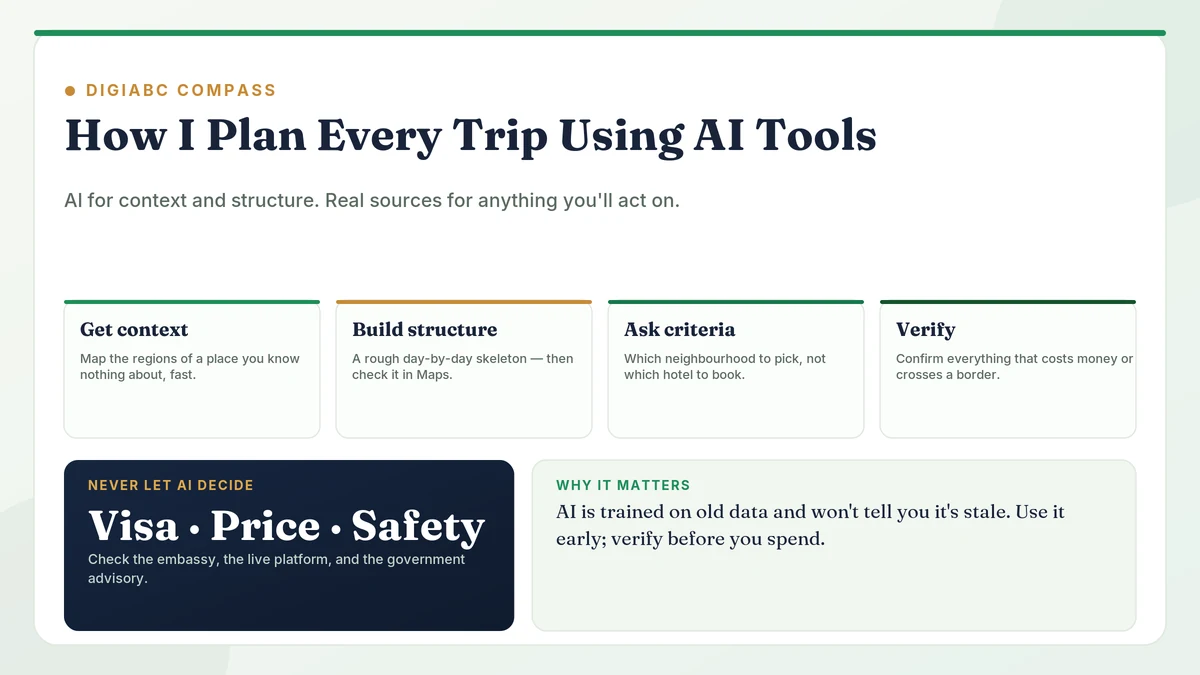
So the rule I use is simple: AI for context and structure. Real sources for anything I am going to act on.
That one rule has saved me from several bad decisions.
Step 1: When I know nothing about a place, I start here
The beginning of a trip is where AI helps most.
When I was planning a trip to Georgia (the country, not the state), I had almost no idea where to start. I did not know which cities were worth visiting, how far apart they were, or how long a realistic trip would take.
So I opened Claude and had a conversation. I asked it to describe the main regions: what each one is like, what kind of traveller each suits, how long each takes without rushing. Not “where should I go.” Just give me the map so I know what questions to ask next.
Twenty minutes of back and forth gave me a clear enough picture to start planning. The same research on travel blogs and Reddit would have taken me four hours, and half the posts would have been outdated.
What I did not ask at this stage: prices, transport times, visa requirements. I treated everything as rough direction only. The AI was helping me understand the shape of the trip, not the details.
Step 2: Building a day by day structure (without the mistakes)
Once I have a basic sense of the destination, I ask the AI to help me build a rough itinerary.
The prompt I use looks something like this:
“I have 12 days in Georgia. I want to see Tbilisi, Kazbegi, and the wine region. I am travelling solo, I like hiking and local food, I do not enjoy large group tours. Give me a rough day by day structure with travel days included. Also flag any sequencing mistakes. If the order does not make geographical sense, tell me.”
That last part (flag the sequencing) is important. AI tools are not naturally good at geography. Without being asked, they will sometimes route you in a loop that wastes two days of travel. Asking them to check themselves catches most of it.
What I get back is a skeleton, not a finished plan. I then open Google Maps and check it properly. Are the travel times realistic? Does the route make sense? Is that bus journey actually two hours or five? Every AI itinerary I have ever received has needed at least two corrections here.
But it still saves a lot of time. A 12-day structure that I can verify and adjust in an hour beats starting from a blank page for an entire afternoon.
Step 3: Accommodation. I ask for criteria, not recommendations
I stopped asking AI tools to recommend specific hotels a long time ago.
The answers come back sounding confident. But the hotels it names are often closed, changed ownership, or described based on reviews from years ago. The AI has never stayed there. It is summarising old text, not giving you a real opinion.
What I do instead: I ask what to look for.
When I was planning Tbilisi, I asked which neighbourhoods are most walkable, which are better if you want nightlife, and which are quieter. That answer was genuinely useful. It helped me filter on Booking.com myself and pick something that matched the trip I was actually planning.
This is the pattern that works with AI and travel. Use it to help you ask better questions. Then go find the real answers yourself.
The three things I never let AI decide
After two years of planning this way, I have three hard rules.
1. Visa and entry requirements: always check officially.
These change without much warning. Getting them wrong means missing a flight or being turned back at the border. I check the official embassy website every time, even for countries I have visited before. An AI confidently telling me I do not need a visa is not the same as documentation.
2. Prices: never use AI numbers for budgeting.
AI tools have a training cutoff and no access to live pricing. Any price they give me (for a hotel, a flight, a bus ticket) I treat as an old estimate. I have seen AI quote accommodation prices that were nearly half the current rate because the data it was trained on was from a different economic moment. Use Skyscanner, Booking.com, and Rome2Rio for real prices.
3. Safety and current conditions: check a government advisory.
Political changes, natural disasters, health advisories, closed borders. None of this is reliably current in AI training data. Before every trip, I check the official travel advisory from a government source. A travel AI that tells you a region is “generally safe” is telling you what was written about it at some point in its training window, not what is happening now.
The tools I actually use
For the research conversation and itinerary building, I use Claude. It holds context well across a longer conversation, which matters when you are going back and forth refining a plan.
For quick factual lookups (“what is the public transport situation in this city”), I also use Perplexity, because it shows its sources. That means I can check when the information is from, which matters a lot for travel.
For everything that involves real decisions, booking, pricing, transport, I use the actual platforms. Booking.com for accommodation. Skyscanner for flights. Rome2Rio for transport options. Wikivoyage when I want community-maintained information without affiliate pressure.
AI is at the start of the process and sometimes in the middle. It is never at the end, when I am about to spend money or hand a document to a border officer.
What to take from this
If AI travel planning has felt unreliable to you, it is unreliable for some things and genuinely fast for others. The skill is knowing which is which.
Use it early, when you need context and structure fast. Stop using it when you need an answer that has to be correct. Anything involving money, documents, or safety gets verified through a real source. Everything else (getting a feel for a destination, sequencing a route, understanding what kind of place suits what kind of trip) AI is faster than anything else I have found.
I plan trips in roughly half the time I used to. The time I save goes into verifying the things that matter, and then actually going.
The travel tips section has notes from specific destinations based on first-hand visits. The AI marketing guide covers how I use these tools in client work.
Written by Kavinder Singh, SEO and Digital Marketing Strategist.
Last updated: August 3, 2026.