Google Business Profile Optimization: A Practitioner’s Setup Guide (2026)
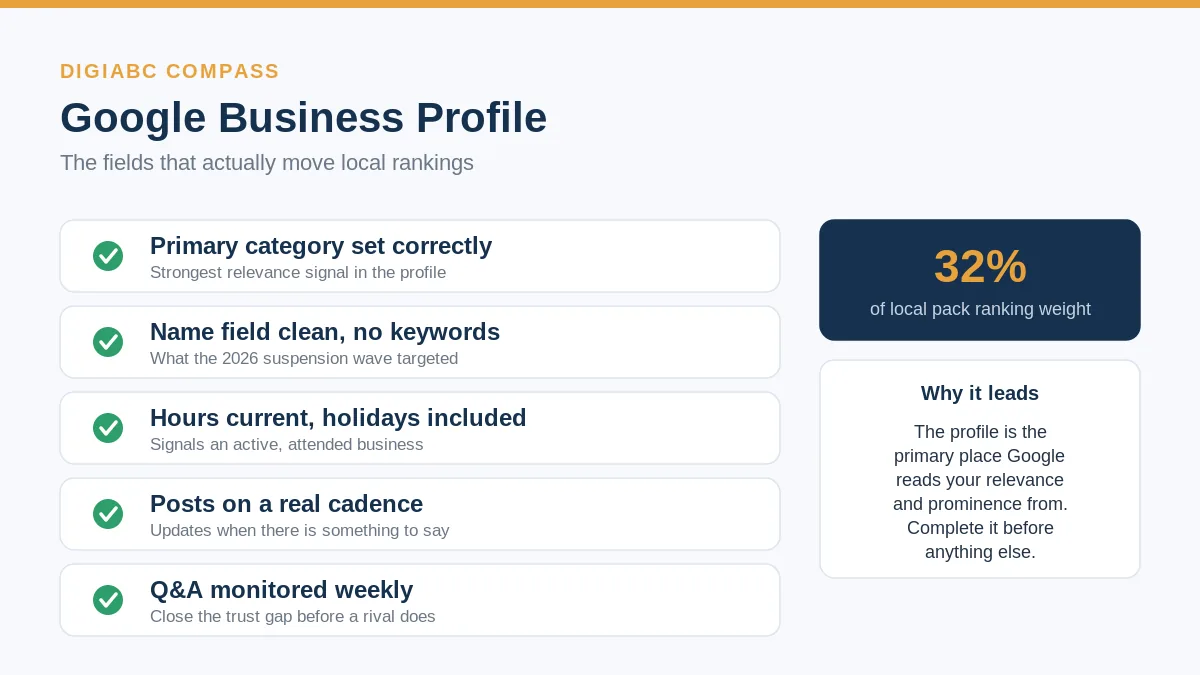
Most guides treat the Google Business Profile like a form you fill out once. That is the reason most profiles underperform. The profile is the single biggest lever you control in local search, and Whitespark’s 2026 Local Search Ranking Factors survey puts Google Business Profile signals at roughly 32% of local pack ranking weight, the largest single bucket in the study.
I have set up and cleaned up a lot of these. The pattern is always the same. The owner picked a category that sounded close, left half the fields blank, and never touched it again. Here is how to do it properly.
What is Google Business Profile optimization?
Google Business Profile optimization is the ongoing work of completing and maintaining your business listing so Google can match it confidently to local searches. It covers your primary category, an accurate name field, current hours, regular posts, monitored questions, and photos, all kept consistent with the rest of your web presence.
Notice the word ongoing. A profile is not a setup task you close out. Google reads an abandoned profile as a business that has stopped paying attention, and that judgment leaks into how often it shows you.
The reason this matters so much comes down to how the local pack works. Standard organic results ask which page on the whole internet best answers a query. The local pack asks a narrower question: which nearby business best matches this search, right now, for this person. Your profile is the primary place Google reads the answer. For the full picture of how that block of three results is ranked, the local SEO guide walks through relevance, distance, and prominence in order.
The primary category is the single setting people get wrong most
Your primary category is the strongest relevance signal in the entire profile. It tells Google what your business fundamentally is, and it directly shapes which searches you are eligible to appear in. One wrong choice here can hold back everything else you do.
The common mistake is picking the category that sounds closest instead of the one that is accurate. A medical spa that lists itself as “Spa” competes with nail salons and massage parlors. Listed correctly as “Medical spa,” it competes with the right set and matches the right intent.
Sit down and search the category list properly. Pick the most specific primary category that genuinely describes your core service, then add secondary categories for the real services you also offer. Do not pad the secondary list with categories you do not actually serve. That dilutes the signal rather than widening it.
One concrete check: search your main keyword in an incognito window, look at the three businesses in the pack, and use a profile viewer extension to see their primary categories. If all three share a category you have not selected, you have found your gap.
The name field is where the March 2026 suspension wave hit
Your business name field must match your real, public-facing name, the one on your signage and legal registration. Adding keywords or city names to it violates Google’s guidelines and is now the fastest way to get suspended, not the clever shortcut it used to be.
This is not a theoretical risk anymore. The March 2026 core update came with an aggressive enforcement sweep against keyword-stuffed business names, and the rounds kept hitting service businesses into May. Locksmiths, movers, and contractors took the worst of it, because those niches leaned hardest on names like “Best Locksmith Atlanta 24/7.”
If your name field has extra words crammed into it, fix it now, before an automated sweep does it for you and you lose your reviews and ranking history in the process. Revert to the clean name. The short-term ranking bump those keywords gave you is gone either way, and one path keeps your profile alive.
Completeness is not a checklist, it is a trust signal
A complete profile is one where every field a customer might check is filled and current: hours, holiday hours, services, attributes, photos, and a real description. Completeness signals to Google that the business is active and well-documented, which feeds directly into prominence.
The fields worth real attention:
- Hours, including holiday hours. A profile showing open hours on a day you are closed costs you a wasted trip and a frustrated customer who leaves it in a review.
- Services and attributes. These add relevance terms Google can match against, and attributes like “wheelchair accessible” or “free wifi” answer real filter searches.
- Photos on a real cadence. Profiles with fresh photos get more interaction, and interaction is a behavioral signal. Add a few real ones each month, not a stock dump on day one.
- A description that reads like a person wrote it. No keyword stuffing here either. Describe what you do and who you serve.
Get the profile to the point where a stranger could understand your business in ten seconds without visiting your site. That is the bar.
Posts and Q&A are about looking alive, not gaming the algorithm
Google Posts and the Q&A section are engagement surfaces. Posting updates and answering questions tells Google someone runs this business day to day, and it gives customers fewer reasons to bounce to a competitor who looks more responsive.
I do not post weekly just to post. If there is nothing worth saying that week, I skip it. Manufactured noise costs more time than the freshness signal returns. When there is a real update, an offer, an event, a new service, that is when a post earns its place.
Q&A is the part most owners ignore, and it is the riskiest one to ignore. Anyone can answer a question on your profile, including a competitor’s salesperson. Seed the obvious questions yourself with honest answers, then check weekly. An unanswered question sitting on your profile reads as nobody minding the store.
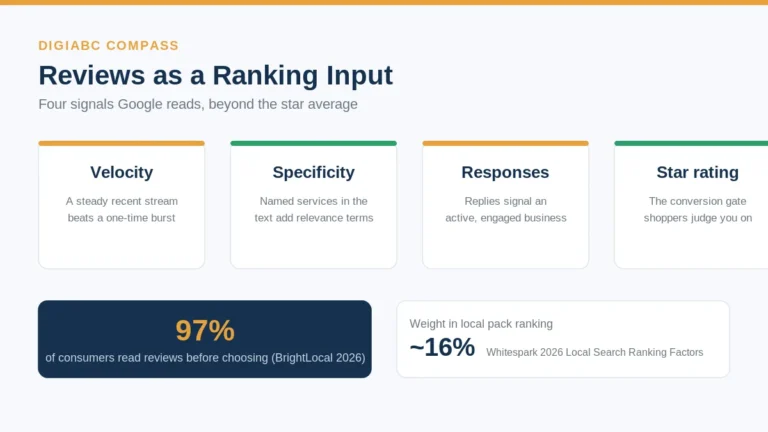
Reviews deserve their own treatment because they sit on both the ranking side and the conversion side. I covered the velocity and response mechanics in the guide on how reviews rank a local business.
Connect the profile to the rest of your presence
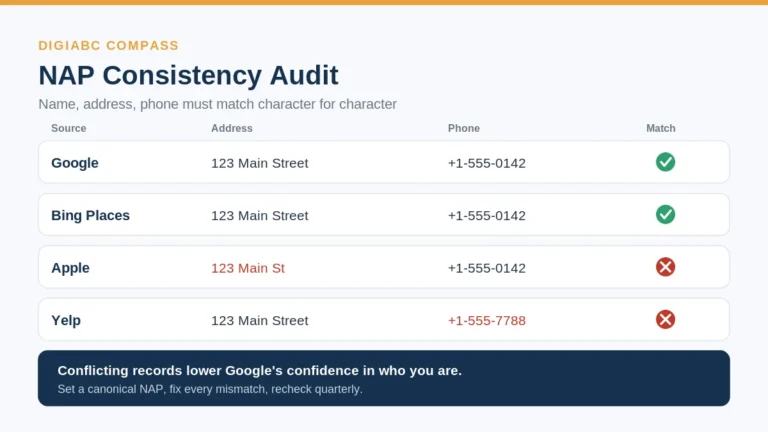
Your profile does not rank in isolation. The name, address, and phone on it must match your website and every directory exactly, and your schema markup should reinforce the same facts. Mismatches between these sources make Google less confident about who you are.
Two pieces finish the job. First, your name, address, and phone need to match character for character everywhere they appear. “123 Main St” on the profile and “123 Main Street” on the site is a conflicting signal, not a stylistic choice. The full process is in the guide on NAP consistency and citations.
Second, your website should carry LocalBusiness schema that names the same business, address, and phone, with a sameAs link pointing back to the profile. That gives Google a clean, machine-readable version of the facts it is already reading off your profile. The setup is covered in the LocalBusiness schema guide.
What to fix first
If you only do three things this week, do these in order. Set the primary category correctly, because everything downstream depends on it. Clean any keywords out of the name field, because that is your suspension risk. Then fill the hours, services, and photos to completion. The posting cadence and Q&A habit come after, and they are habits, not one-time tasks.
Local SEO timelines move in three to six month windows before early signals show in Search Console. The profile work is where that clock starts, which is exactly why it goes first.
Frequently asked questions
How long does it take to see results from optimizing a Google Business Profile?
Expect early movement in three to six months and meaningful change in calls and visits in six to twelve. Low-competition niches move faster. Anyone promising a result in weeks is either in an easy market or not being straight with you.
Can I add my city or service to my business name to rank better?
No. That violates Google’s guidelines and is the most common trigger for the 2026 suspension wave. Use your real name only, and put city and service relevance into your category, services, description, and location pages instead.
How many photos should I add and how often?
There is no magic number. Add a handful of real photos at setup, then a few each month. Consistent, genuine photos beat a single large upload that never changes, because interaction with fresh images is itself a signal.
Do I need a physical address if I travel to customers?
In most regions you still provide an address for verification, but you can hide it and set a service area instead. Plumbers, electricians, and mobile groomers should lean on the service-area setup rather than a public pin.
Written by Kavinder Singh (Kavi), digital marketing strategist at DigiABC Compass.