Title Tags and Meta Descriptions: How to Write Them So People Click
Your title tag and meta description are the first things people see in Google. Before anyone reads your page, they read these two lines. Get them right and more people click. Get them wrong and even a #1 ranking earns less traffic than it should.
I check these two elements first in every audit I do. They take minutes to fix and the results show up fast. This guide covers what each one does, what it does not do, and exactly how to write both. They are the most visible part of on-page SEO you control.
What is a title tag?
A title tag is the HTML element that names your page. Google uses it as a ranking signal and shows it as the blue clickable headline in search results. It is one of the few page elements that affects both your ranking and your clicks.
Think of the title tag as doing two jobs at once.
Job one is for Google. The title tells Google what your page is about. A page titled “Technical SEO: A Beginner’s Guide” gets matched to technical SEO searches quickly. A page titled “You Need to Read This” gives Google nothing to work with.
Job two is for people. On a results page, ten sites compete for one click. Your title is your whole pitch. Nothing else you wrote matters if the title fails here.
How to write a good title tag
Follow four simple rules:
- Keep it under 60 characters. Google cuts off longer titles. Yours should never end in “…”
- Put the main keyword near the start. People scan the first few words and stop. So does Google.
- Make it honest. The title must describe what the page actually delivers.
- Make every title unique. No two pages on your site should share a title.
Here is the difference in practice:
- Weak: “Technical SEO Guide | Technical SEO Tips | Best Technical SEO”
- Strong: “Technical SEO: How to Make Your Site Easy to Crawl and Index”
The weak one repeats the keyword three times and says nothing. The strong one uses the keyword once and makes a clear promise. Google reads meaning, not keyword count.
What is a meta description?
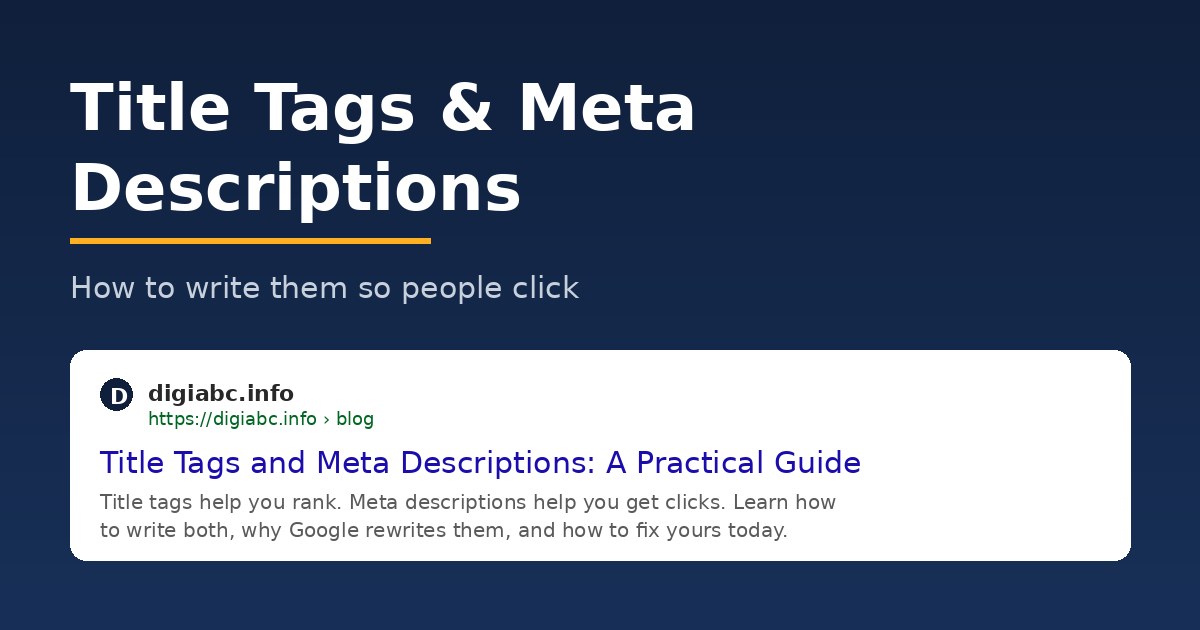
A meta description is a short summary of your page, shown under the title in search results. It does not affect rankings. It affects whether people click. That makes it sales copy rather than ranking copy. It is also free advertising space that most sites waste.
Google said years ago that meta descriptions carry zero ranking weight. Many people heard that and stopped writing them. That is a mistake.
Here is why. Imagine your page ranks #4. The three results above you have lazy, auto-generated descriptions. Yours clearly answers the searcher’s question. Many of those clicks come to you instead. The description cannot raise your position, but it can raise your traffic at the same position.
How to write a good meta description
- Answer the search, don’t tease it. Say what the page delivers.
- Stay around 150 to 160 characters. Longer gets cut mid-sentence.
- Use one specific detail. Specific beats vague every time.
Compare:
- Weak: “Everything you need to know about SEO. Read more now!”
- Strong: “Learn how robots.txt, sitemaps, and Core Web Vitals fit together, with steps you can apply today.”
The strong one tells the reader exactly what they will get. That is the entire skill.
Why does Google rewrite your titles and descriptions?
Google rewrites titles when it thinks yours is a poor match for the search: too long, stuffed with keywords, copied across pages, or vague. A Zyppy study of 80,000+ titles found Google rewrote about 61% of them. Descriptions get replaced even more often, around 62% of the time per Ahrefs.
Those numbers sound alarming. Look closer and the picture is calmer.
Most title rewrites are small. Google trims a long brand name, shortens an overlong title, or swaps in your H1 because it describes the page better. Full replacements mostly happen to titles that earned it.
You cannot stop Google from rewriting. You can make rewriting unnecessary. Titles that survive untouched share three traits: they fit the length limit, they describe the page accurately, and no other page on the site uses them. Duplicate titles are the trigger I see most often. The usual culprit is a CMS stamping the same suffix on every page.
Descriptions are different. Google may pull text from your meta description, page content, headings, lists, or other on-page elements when it believes those sections better match the user’s query. In many cases, the displayed snippet is a combination of content sources rather than the exact meta description you wrote.
The lesson: write clear, complete sentences in your content too, because any of them might become your snippet. Clean, quotable sentences are also what AI Overviews and tools like ChatGPT pull from when they cite sources. The same writing wins in both places.
One useful trick: when Google rewrites your title, it is telling you what it thinks your page is about. Read the rewrite. It is free feedback.
A Real Example of Google Rewriting Titles and Descriptions
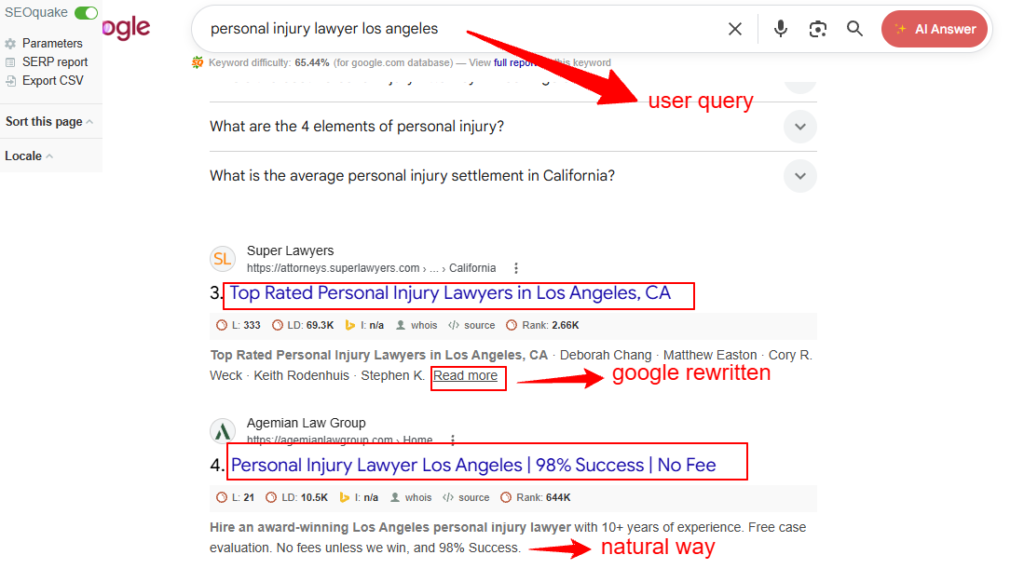
The screenshot below shows something many SEOs miss: Google does not always display the title tag and meta description exactly as you wrote them.
For the search query “personal injury lawyer los angeles”, Google rewrote the title of one result to:
“Top Rated Personal Injury Lawyers in Los Angeles, CA”
The page itself likely used a different title tag, but Google determined that this version better matched the searcher’s intent.
At the same time, Google displayed a snippet containing attorney names and location information pulled directly from the page content. In this case, the snippet was not acting like a traditional meta description. Google chose content it believed would be more useful for the search.
Compare that with the result below it:
“Personal Injury Lawyer Los Angeles | 98% Success | No Fee”
Google displayed the title largely as written and showed a description that closely matched the page’s original messaging.
This illustrates an important point:
Google no longer treats title tags and meta descriptions as fixed instructions. They are suggestions.
When Google believes your title, meta description, heading, anchor text, or page content better answers a search query, it may rewrite the search snippet to improve relevance.
What This Means for SEO
Many SEO guides focus only on writing the perfect title tag and meta description. That is no longer enough.
Today, Google may pull information from:
- The title tag
- The H1 heading
- Internal anchor text
- External anchor text
- Image alt text
- Structured data
- Body content
This is why the best snippets often come from pages with strong topical relevance rather than pages with the most aggressively optimized metadata.
The New Goal: Write for the Query, Not Just the Tag
Instead of asking:
“How can I fit my keyword into the title?”
Ask:
“Does this page clearly answer the searcher’s question?”
When your title, heading, content, and search intent all align, Google has less reason to rewrite your snippet.
And when it does rewrite it, the changes are usually minor because your page already communicates its topic clearly.
A useful SEO habit is to search your primary keyword periodically and compare:
- Your actual title tag
- Your actual meta description
- What Google displays in search results
Any differences can reveal how Google interprets your page and what it believes users want to see before clicking.
How do these two tags fit into on-page SEO?
The title gets you ranked and seen. The description gets you clicked. The rest of your on-page SEO (headings, content, internal links) must then keep the promise those two lines made. A snippet that over-promises creates visitors who leave in seconds.
A search snippet is a promise. If your title says “complete checklist” and the page holds three thin paragraphs, the visitor hits back immediately. Write the snippet after the page is finished, and make it the most accurate one-line summary you can.
Your title and H1 should also agree. They do not need to match word for word. The title can be shorter for the search results page, and the H1 a little fuller on the page. But they must describe the same thing. When they conflict, Google picks the one it trusts, and that is usually the H1.
A note on mobile. Most searches now happen on phones, where titles get cut near 50 characters and descriptions often show one line. Front-load harder: your first five words must carry the full meaning. Google bolds the words that match the search, and a front-loaded match stands out on a small screen.
Your 30-minute fix, step by step
Do this today:
- Open the Performance report in Google Search Console.
- Sort by impressions. Find pages with high impressions but click-through rate under 2%.
- For each page: rewrite the title (under 60 characters, keyword first, honest, unique).
- Rewrite the description (under 160 characters, answers the search, one specific detail).
- Search your own keyword next week and check what Google actually displays.
Pages with impressions but no clicks are the fastest wins in SEO. The ranking already exists. Only the click is missing.
FAQ
Do title tags still affect rankings in 2026?
Yes. The title tag is still a confirmed ranking signal. It is not as powerful as it was years ago, but no other element gives you this much impact for five minutes of work.
Do meta descriptions affect SEO rankings?
No. They affect clicks, not position. But clicks are the whole point of ranking, so write them anyway, and write them as sales copy.
How long should a title tag be?
Under 60 characters is the safe rule. Google actually cuts by pixel width (about 600px on desktop, less on mobile), so test important titles in a free SERP preview tool.
Why does Google show a different description than mine?
Google swaps in body text when it answers the specific search better. Ahrefs measured this at about 62% of pages. Write your description for the page’s main query, and accept that rare searches will pull other sentences.
Should every page have a unique title and description?
Yes, every single one. Duplicate titles are a top reason Google rewrites them, and a duplicated description wastes your one line of free ad space.
Written by Kavinder Singh, SEO & Digital Marketing Strategist.
Last updated: August 3, 2026.