Noindex vs Nofollow vs Disallow: What Each One Does
Noindex asks search engines to keep a crawlable page out of search results. Nofollow marks a link as a hint about whether Google should use it for link signals. Disallow in robots.txt asks compliant crawlers not to fetch a URL. A blocked page cannot expose its noindex directive to Google.
What is the difference between noindex, nofollow, and disallow?
These three are constantly confused because they all sound like ways of saying no to Google. They act at different points in the pipeline. Crawling comes first, then indexing, then ranking. Disallow acts on crawling. Noindex acts on indexing. Nofollow acts on the link signals that feed ranking.
A common source of confusion is a URL that remains in Google after a robots.txt block. Disallow controls crawling; it does not remove a URL from Search. This guide explains which directive fits each situation and how it connects to the technical SEO guide.
Quick facts
| Directive | Stage controlled | Where it lives | Removes from search |
|---|---|---|---|
| Disallow | Crawling | robots.txt | No |
| Noindex | Indexing | Meta robots tag or X-Robots-Tag header | Yes |
| Nofollow | Link signal passing | rel attribute on a link, or meta robots | No |
How does noindex work?
A noindex directive tells Google not to include a page in Search once Google can crawl and process it. Google’s noindex guidance notes that links to the page do not override the directive. A robots.txt block can prevent Google from seeing it.
The two implementations
Meta robots tag, for HTML pages, placed in the head:
<meta name="robots" content="noindex">X-Robots-Tag HTTP header, for PDFs, images, videos, and any non-HTML file:
X-Robots-Tag: noindexBoth have identical effect. Choose by file type.
The rule everyone breaks
Keep the page crawlable while you want Google to read its noindex directive. If robots.txt blocks access, Google cannot see the directive and may keep the URL eligible to appear in Search. Google’s robots.txt documentation explains this interaction.
Expert tip: When you want a page removed and it is currently disallowed, do this in order. First remove the disallow rule. Second, add noindex. Third, wait for Google to recrawl and drop it. Only then, if you still want to save crawl budget, add the disallow rule back. Doing it in the wrong order leaves the page indexed indefinitely.
Common noindex values
| Value | Effect |
|---|---|
noindex |
Do not index this page; links are still followed |
noindex, nofollow |
Do not index; nofollow is a hint about links, not a hard crawl block |
noindex, follow |
Do not index; links may be followed while Google crawls the page. Long-term behavior is not a reliable way to manage link flow |
noarchive |
Deprecated for Google Search; it no longer changes Google Search results |
nosnippet |
Do not show a text snippet |
max-snippet:[n] |
Limit snippet length in characters |
noimageindex |
Do not index images on this page |
How does nofollow work?
Nofollow is a link attribute that asks Google not to associate your site with the linked page or pass ranking signals through that link. Google treats it as a hint, so it may still crawl the URL or use the link for discovery.
<a href="https://example.com" rel="nofollow">Example</a>Since 2019 Google treats nofollow as a hint rather than a strict directive, meaning it may still use these links for crawling and indexing purposes at its discretion. Google also introduced two more specific values in the same change:
| Attribute | Meaning | Use for |
|---|---|---|
rel="nofollow" |
Do not associate my site with this link | Untrusted or user-generated links generally |
rel="sponsored" |
This link is paid or an affiliate | Advertising, affiliate, and sponsored placements |
rel="ugc" |
User-generated content | Comments and forum posts |
rel="noopener" |
Security attribute, not SEO | Any link opening in a new tab |
You can also apply nofollow page-wide with <meta name="robots" content="nofollow">. This is rarely useful for a typical site, and Google treats nofollow as a hint rather than a guarantee that every link will be ignored.
When to use nofollow
- Paid, sponsored, and affiliate links. Use
sponsored. Google asks site owners to qualify paid links; usesponsoredornofollowas appropriate. - Comment and forum links you do not vet. Use
ugc. - Links to sites you cannot vouch for.
- Login, cart, and account URLs where following adds nothing.
When not to use nofollow
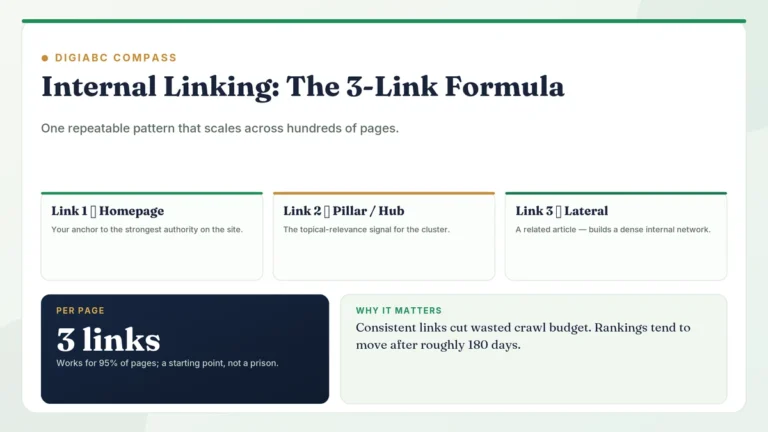
Do not nofollow your own internal links in an attempt to sculpt PageRank. This does not redistribute PageRank to the other links on the page. Manage internal signal flow through your site structure instead; the approach is covered in the internal linking 3-link formula.
How does disallow work?
Disallow lives in robots.txt and stops compliant crawlers from requesting a URL:
User-agent: *
Disallow: /cart/
It says nothing about indexing. A disallowed URL that other sites link to can still appear in results, showing the URL with no description because Google could not fetch the content. The full mechanics, including rule precedence and wildcards, are in robots.txt explained.
Full comparison
| Disallow | Noindex | Nofollow | |
|---|---|---|---|
| Stops crawling | Yes | No | No |
| Stops indexing | No | Yes | No |
| Limits signal passing | May limit discovery signals | Can change over time | Hint; not guaranteed |
| Requires page to be crawlable | N/A | Yes | Yes |
| How Google treats it | Robots.txt request for compliant crawlers | Directive when Google can crawl the page | Hint since 2019 |
| Saves crawl budget | Yes | No | Marginally |
| Scope | Path pattern | One page or file | One link, or one page |
| Visible publicly | Yes, the file is public | In page source | In page source |
How to choose: a decision guide
- You want Google to remove a page from Search: allow crawling, add noindex, and wait for Google to recrawl it.
- Genuinely private or confidential: password protection. Neither noindex nor disallow is a security control.
- No search value and generating huge crawl waste, for example faceted filters: disallow.
- Has search value but you do not want to endorse an outbound link: nofollow that link.
- Paid or affiliate link: qualify it with
rel="sponsored"for Google. Any user-facing affiliate disclosure is a separate requirement. - Duplicate of another page, both need to exist: canonical tag, not noindex.
- Page has permanently moved: 301 redirect.
- Page deleted with no equivalent: 404 or 410, not noindex.
Typical pages and what to apply
| Page type | Recommended treatment | Why |
|---|---|---|
| Thank-you and confirmation pages | noindex | No search value; can leak into results |
| Internal site search results | Keep crawlable with noindex if they should stay out of Search | Google must fetch the page to see noindex; do not combine it with disallow |
| Cart and checkout | disallow | Crawl waste; no search value |
| Login and account pages | noindex | Should not surface in results |
| Tag archives | Evaluate individually | Noindex only if they have little independent value and duplicate other pages |
| Paginated archive pages | index, self-canonical | Needed for discovery of deeper posts |
| Author archives | Evaluate individually | Keep useful, distinct author information indexable; noindex only if the archive adds no value |
| Faceted filter URLs | disallow the parameter pattern | Combinatorial explosion of URLs |
| Staging environment | Password protection | The only reliable method |
| Gated PDFs | X-Robots-Tag: noindex | Meta tags do not work in PDFs |
Common mistakes
| Mistake | What actually happens | Fix |
|---|---|---|
| Disallow plus noindex together | Google may not see the noindex directive, so the URL can remain indexed | Allow crawling until Google processes noindex |
| Using disallow to remove a page | URL keeps appearing without a description | Use noindex |
| Noindex left on after a site launch | Entire site deindexed | Uncheck “Discourage search engines” in WordPress settings |
| Nofollow on internal links to sculpt PageRank | Google does not recommend using nofollow to sculpt internal link signals; manage important pages through crawlable site structure instead | Fix site structure instead |
| Paid links without a qualifying attribute | May violate Google spam policies | Add rel=”sponsored” or rel=”nofollow” as appropriate |
| Using robots.txt to hide sensitive URLs | You publish a public list of them | Use authentication |
| Noindex on a page that should be canonicalised | Google may exclude it instead of consolidating it as the preferred URL | Use a canonical tag when both URLs should remain available |
| Noindex on paginated pages | Deeper content never discovered | Keep pagination indexable |
| Noindexed URLs left in the sitemap | Contradictory signals | Exclude them from the sitemap |
How to check what is applied
- View source and search for
name="robots"to see the meta tag. - Check headers for X-Robots-Tag:
curl -sI https://example.com/page/ | grep -i x-robots - Read robots.txt at the root of the domain.
- URL Inspection in Search Console shows crawl allowance, indexing allowance, and Google’s chosen canonical in one view. This is the authoritative check.
- The Pages report groups URLs under “Excluded by noindex tag” and “Blocked by robots.txt”, which makes bulk problems obvious.
Implementation checklist
- No page carries both a robots.txt disallow and a noindex directive
- WordPress “Discourage search engines” is unchecked on production
- Thank-you, login, and internal search pages that should stay out of Search are noindexed and remain crawlable until Google sees the directive
- Cart, checkout, and filter patterns are disallowed
- Affiliate and paid links use rel=”sponsored”
- Comment links use rel=”ugc”
- No internal links carry nofollow for sculpting purposes
- Non-HTML files use X-Robots-Tag rather than meta tags
- Noindexed URLs are excluded from the sitemap
- Staging is behind authentication, not robots.txt
- Paginated pages remain indexable
- Search Console excluded-page reports reviewed monthly
Frequently asked questions
Why is my disallowed page still in Google?
Because disallow blocks crawling, not indexing. If other pages link to the URL, Google can index the address without the content. Remove the disallow rule, add noindex, and wait for a recrawl.
Does noindex remove a page immediately?
No. Google must recrawl the page to see the tag. That can take days or weeks. You can request indexing in URL Inspection, but that does not guarantee a faster recrawl. Use the Removals tool for an urgent temporary hide while the noindex takes hold.
Is noindex, follow still useful?
Google may crawl long-term noindexed pages less often, so links on them may also be crawled less often. Do not rely on them to pass link signals or serve as a route for discovery.
Does nofollow stop Google finding a page?
No. Google treats nofollow as a hint, not a reliable way to block crawling or discovery. Use noindex when a crawlable page should stay out of Search.
Should I nofollow all external links?
Credible citations help readers check factual claims; ordinary editorial links do not need nofollow. Google’s outbound-link guidance recommends qualifying paid, user-generated, or otherwise untrusted links.
Can I noindex a PDF?
Yes, using the X-Robots-Tag HTTP header. PDFs have no HTML head, so meta tags are not an option.
Does noindex hurt the rest of my site?
No, when applied correctly to pages with no search value. Noindex only when an archive has no independent search value; the directive does not automatically improve site-wide quality. Accidentally noindexing valuable pages is the risk, which is why the monthly Search Console review matters.
What is the fastest way to remove a URL from Google?
Use the Removals tool in Search Console for a temporary hide of roughly six months, and apply noindex or delete the page in parallel so the removal becomes permanent. The Removals tool alone is not a permanent solution.
Key takeaways
- Disallow controls crawling, noindex controls indexing, nofollow controls link signals.
- Never disallow a page you want deindexed; the noindex will never be read.
- Noindex is a directive once Google can crawl the page; nofollow is a hint.
- Use sponsored for paid links and ugc for comments.
- Neither disallow nor noindex provides privacy. Use passwords.
- Use canonicals for duplicates and redirects for moved pages, not noindex.
- URL Inspection is the authoritative check for what is actually applied.
Conclusion
Once you place these three at their correct stage of the pipeline, the confusion disappears. Ask what you are trying to prevent: a fetch, an index entry, or an endorsement. The answer names the tool. Remember that a robots.txt block can prevent Google from seeing noindex. If the URL is already indexed, it may remain listed until Google can crawl it again.
Related articles
- Technical SEO guide
- Robots.txt explained
- Canonical tags and duplicate content
- 301 vs 302 redirects
- XML sitemaps explained
External references
- Google Search Central: Block search indexing with noindex
- Google Search Central: Qualify outbound links
- Google Search Central: Introduction to robots.txt


2 Comments