Google Tag and Google Tag Manager Are Merging: New GTM Update
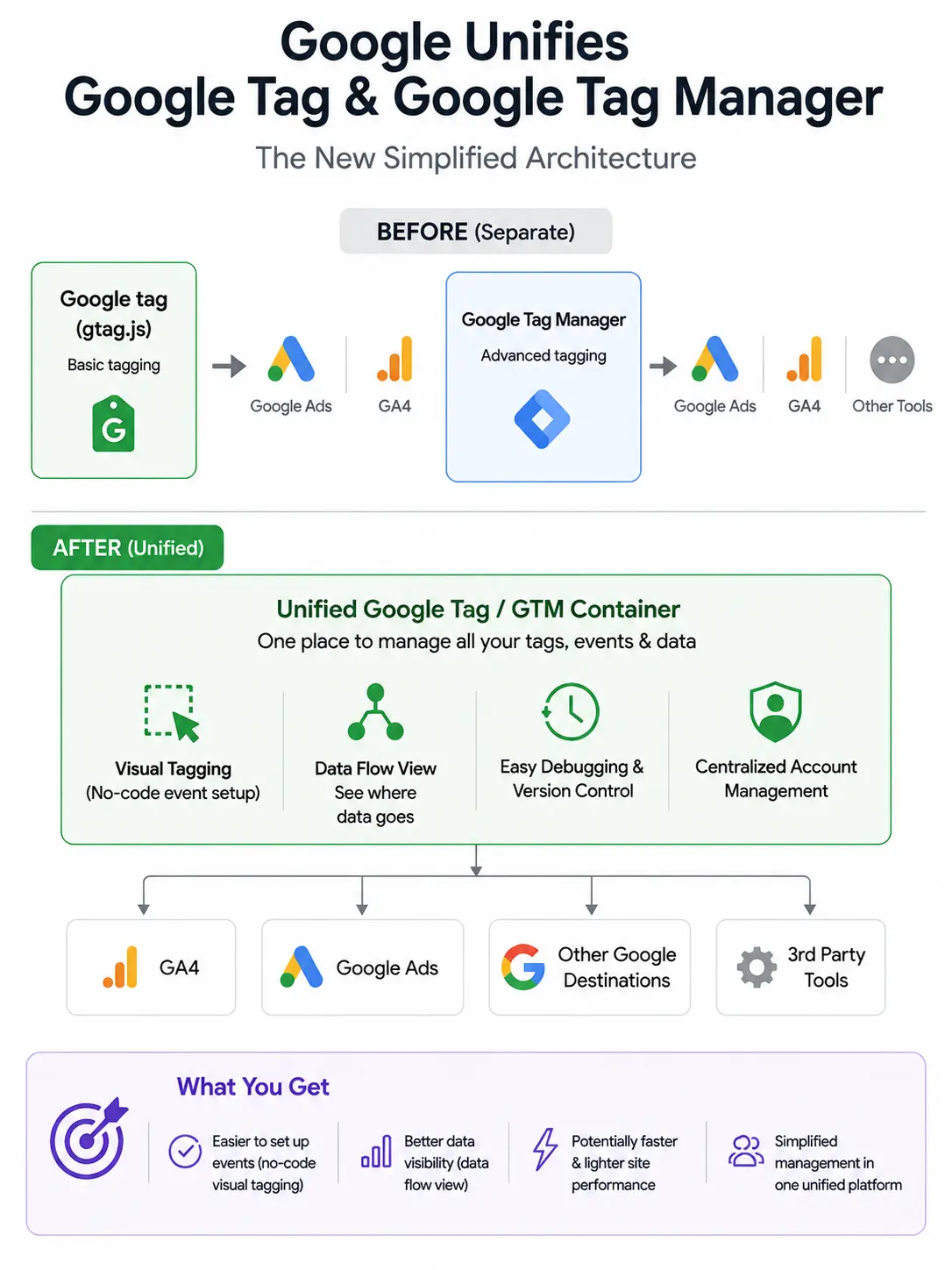
On August 20, 2026, Google did something it had been putting off for years. It stopped treating Google Tag and Google Tag Manager as two separate products. A site running only the basic gtag.js snippet now sits inside a real container, with debug, versioning, and an actual interface, without a migration on your side.
The LinkedIn take on this update was loud and, in a few places, wrong. Here is what actually shipped, what it changes for measurement, and worked examples of where teams are already tripping over it.
What is the unified Google Tag and Tag Manager update?
The unified update, released August 20, 2026, upgrades every Google tag to work as a full Google Tag Manager container. It brings Tag Manager’s interface, debugging, and version control to sites that only had gtag.js, adds a visual point-and-click way to build events by selecting elements on your site, and lets qualifying containers send data to Google destinations without loading the extra gtag.js file.
Delivery is in-place. Existing tags keep firing exactly as they did. Nothing new appears in your data until you open the interface and accept a proposed change.
The five changes worth knowing
Five moving parts shifted at once: unified container architecture, visual event tagging in beta, a redesigned Overview page, direct data transmission that skips gtag.js in some cases, and a new visual map of where your measurement data flows.
Taken together, they reduce setup friction for smaller sites and add visibility for larger ones. Taken carelessly, they will create duplicate conversions and brittle event selectors on sites that already had a clean setup.
1. Google tags now behave as full GTM containers
Before this update, a site with only the basic Google tag snippet had no interface. You configured it through Ads or Analytics, and there was no Preview mode of its own. Now the same snippet is backed by a container. You get Preview, versioning, workspace history, and the ability to add tags, triggers, and variables through the UI.
The existing tag behavior does not change. You have to open the interface and use the new capabilities for anything to move.
Worked example. A small B2B site had `gtag(‘event’, ‘form_submit’)` hard-coded on the contact form. Before the update, changing that event name meant editing the theme file and redeploying. After the update, the same site can open the auto-created container, add a new event tag with a form-submission trigger, and version it, without touching the theme. The old hard-coded event keeps firing until it is removed.
2. Visual tagging is live in beta, for a narrow use case
You browse your own site the way a customer would, select the element that represents the action you care about, and Google generates the trigger and selector for you. In this first release, it is limited to Google Ads purchase conversions. Wider rollout is planned across 2026.
This is the change most likely to be misused. Two failure modes worth planning for:
- Duplicate conversions. If a purchase event already fires through GA4 or through a manual Ads tag, the new visual event will fire alongside it. Ads reporting will show inflated conversions and your ROAS math will lie until you deduplicate.
- Fragile selectors. Auto-generated CSS selectors break the moment a developer renames a class. Sites on frameworks that hash class names on every build will see silent event loss within a week.
Worked example of the duplicate trap. An ecommerce store already fires a purchase conversion from its GA4 tag on the `/thank-you/` page. A marketer, testing the new visual tagging, clicks the “Confirm order” button on the checkout page and defines that as a purchase conversion. Both fire on the same session. The Google Ads column now shows two purchases per real order. Weekly ROAS looks like it doubled. The bidding algorithm reacts to the wrong signal and CPCs climb.
Fix. If you use visual tagging, disable the older conversion tag in the same session, or route both through a single transaction_id in a deduplication rule inside Ads.
Worked example of the fragile selector trap. A React site rebuilds nightly and Tailwind hashes utility classes on every build. Monday’s visual event points at `button.bg-emerald-600_hash8f2a`. On Tuesday the class becomes `bg-emerald-600_hash1c9e`. The event stops firing. Ads reports a conversion drop of 40 percent by Friday, but nothing broke on the site itself.
Fix. Add a stable `data-track=”purchase-confirm”` attribute on any button you plan to visually tag, and target that data attribute rather than the auto-generated selector.
3. Redesigned Overview page
The Overview screen now leads with a Settings section for container-wide configuration. Triggers, variables, templates, and folders sit behind a collapsible Advanced section. Every feature that existed still exists. It has just been re-shelved. Old team training docs and screenshots will not match what people see.
Worked example. A junior analyst spent forty minutes looking for the Variables screen after the redesign, then created a duplicate variable in the wrong workspace. It cost the agency an afternoon of cleanup. The fix cost nothing: a two-slide screenshot doc showing where the Advanced section lives.
4. Optimized containers can drop the extra gtag.js
Where a container qualifies, data can go straight to Google destinations without loading the extra gtag.js file. Fewer bytes, one less request, marginally faster measurement dispatch. This is opt-in per container and reviewed before publish.
Realistic impact. On a typical WordPress theme with a Lighthouse LCP of 2.3 seconds, dropping the extra gtag.js reduces total blocking time by roughly 40 to 90 ms on 4G, depending on how the tag was loaded. It rarely changes the LCP score itself. If your LCP problem is a hero image or a render-blocking font, this update will not save you. Confidence: High.
5. Visual data-flow map
A map view shows which Google destinations, such as Ads, GA4, and Merchant Center, are receiving data from a container. Useful for finding orphan destinations, permission mismatches, or a stray Ads account that should have been unlinked six months ago.
Worked example. A SaaS company opened the map and found two old Google Ads accounts still receiving conversion data: one from a shuttered EMEA test in 2024, one from a former agency’s shared account. Both got unlinked in ten minutes. The main Ads account’s Smart Bidding model, which had been reacting to noisy signals from the ghosts, stabilized within two weeks.
What this is not
This is not an SEO ranking update. It does not change how Googlebot crawls, indexes, or ranks pages. It does not change Core Web Vitals thresholds. It does not change how organic performance is attributed inside Search Console.
The value for SEO teams is downstream. Cleaner measurement lets you tie organic traffic to actual outcomes, which is what makes an SEO program defensible in a budget review. That was already possible with a well-built GTM setup. What changed is the friction, not the ceiling.
Who should care, and in what order
Impact ranks by how mature your current measurement is. Sites on basic gtag.js gain the most. Sites with a solid GTM setup gain the least. Sites with a heavily customized GTM setup carry the most risk from accepting proposed optimizations without review.
| Setup you have today | What to do first | Priority |
|---|---|---|
| Only the basic Google tag snippet, no GTM | Open the interface, explore Preview mode, add one manual event for a real business goal before touching visual tagging | High |
| Standard GTM container, GA4 and Ads configured | Open the new data-flow map, check for stale destinations, keep visual tagging off for now | Medium |
| Complex GTM with custom templates, server-side, consent mode v2 | Do not accept a proposed optimization without reviewing what it will remove. Treat visual tagging as prohibited until dedup logic exists | Critical |
| Enterprise stack with GA4 plus a data warehouse | Confirm the update does not alter events you feed to BigQuery. Validate schema parity for one week after any change | High |
The five checks to run this week
A short pre-flight before you accept any of the new features: audit current conversions, review linked destinations, decide your visual-tagging policy, plan a QA window, and update whoever writes the numbers on the monthly report.
- Baseline your conversion counts. Export the last 30 days of key conversions from Ads and GA4. Save the numbers. If they jump after you touch anything, you know where to look.
- Open the new destinations map. Note every account currently receiving data. Unlink anything that no longer belongs.
- Write a one-page policy on visual tagging. Who can use it, what can be tagged that way, what stays in manual GTM. Skip this and someone on your team will tag a checkout button next week and quietly double your reported ROAS.
- Test consent mode still works. Direct data transmission changes how the tag payload is built. On consent mode v2, run the tag assistant on a page in a denied state and confirm nothing sends that should not.
- Update the measurement plan doc. If nobody has one, this is the week to write it. The unified interface is easier. Easier is only good when the plan behind it is right.
Common questions
Do I have to migrate anything?
No. Existing tags and containers keep working. The upgrade is delivered in place. You choose whether to use the new capabilities.
Will this speed up my site?
Marginally, and only if you accept optimized containers that drop the extra gtag.js load. Expect a small reduction in requests, not a Core Web Vitals win on its own.
Should I use visual tagging for everything?
No. Use it for a small number of clear, stable actions on sites where the HTML does not change often. Keep revenue-critical conversions in manual GTM where you control the trigger.
Does this change GA4 in any way?
Not directly. GA4 remains the destination. What changed is the container that sends to it. Reports, Explorations, and the BigQuery export are unaffected.
What about server-side GTM?
Server-side is unchanged by this release. If you run it, keep running it. The new client-side simplifications do not remove any reason to have a server container.
The measurement chain the update quietly protects
The reason this matters for SEO is not the interface. It is the chain. Organic traffic, then user actions, then leads or transactions, then business outcomes. Any break in that chain leaves an SEO program looking like a cost center.
The unified tagging update lowers the technical barrier at one link in that chain. It does not build the chain for you. That still requires defining what a meaningful conversion is, preventing duplicate tracking, handling consent honestly, and validating the data before anyone puts it on a slide.
If your current setup does those four things, the update is a modest win. If it does not, no interface will save the numbers. Fix the plan first, then use the new tools to run it with less friction.